

AI agents are becoming increasingly capable of completing tasks on behalf of users, from organising activities and managing online accounts to navigating websites and handling repetitive work. However, giving an AI assistant access to personal accounts creates an important security challenge: the assistant needs to authenticate, but it should not need to see or store the user’s password.
1Password for Agents addresses this problem by allowing compatible AI agents to request access to credentials stored in a user’s 1Password vault. When permission is granted, 1Password can fill the required credentials directly into the destination website without revealing the secret values to the agent itself.
The approach separates the ability to perform an authorised action from the ability to read the credentials that make the action possible. Rather than copying a password into an AI conversation or allowing an assistant to retain it, the password manager acts as a controlled layer between the AI agent and the account.
This distinction matters as AI tools move beyond answering questions and begin interacting with websites and services. An assistant might need to sign in to complete a task, but that does not mean it should receive unrestricted access to the user’s digital identity.
The new 1Password for Agents platform is designed around that principle: agents can request access, users can approve or reject the request, and credentials remain under the control of the password manager.
How the Secure AI Login Process Works
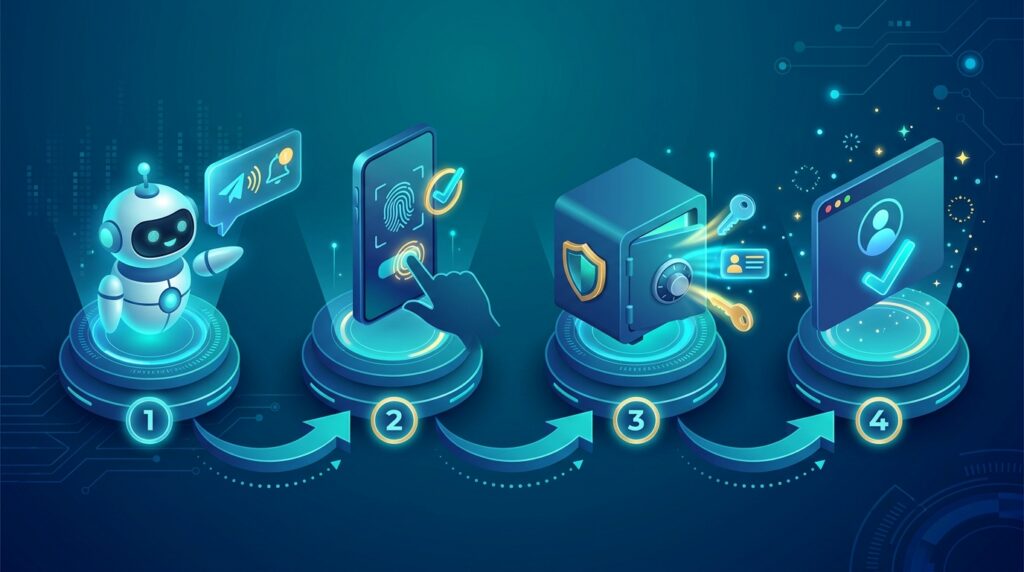
The process begins when an AI agent reaches a website or task that requires authentication. Instead of asking the user to reveal a password directly to the AI, the agent requests access to an appropriate credential through the supported integration.
The user then receives an approval request that identifies the credential being requested and explains the intended access. The user can review the request and decide whether to approve it. If the request is rejected, the agent does not receive the requested credential access through this process.
When the user approves the request, 1Password for Agents enables 1Password to fill the relevant login information directly into the destination website. The AI agent can continue its task without being shown the actual password or other protected secret values.
This model is different from simply storing a password in an AI assistant’s memory or pasting it into a prompt. Those approaches can expose sensitive information to conversation histories, logs, connected services or other systems involved in processing the request.
By keeping credential handling within the password manager, 1Password for Agents aims to reduce the amount of sensitive information that an AI system needs to handle. The agent receives the access required for the approved task, rather than unrestricted visibility into the user’s credentials.
User approval is an important part of the process. It provides an opportunity to evaluate whether the requested access makes sense before the agent signs in. However, approval should still be based on the actual task and destination, rather than being treated as an automatic confirmation for every request.
Which AI Agents Can Use 1Password for Agents?

The launch of 1Password for Agents introduces a broader approach to securing personal AI assistants, rather than limiting credential access to a single type of automated workflow.
The announced integrations include Meta’s Muse, SpaceX’s Grok Bot, Town’s Townie, Anthropic’s Claude Duet, and OpenAI’s ChatGPT Work and Dots. Availability differs between integrations, with some rolling out over time and others described as coming soon. Users should check the relevant product announcements for the current status of individual integrations.
Additional participating companies include Browserbase, Browser Use, Dana, Instinct, KERNEL, Perplexity, Ramp, Tomo and Wajo. Their participation indicates that credential security is becoming an important consideration across a range of AI products and services.
These integrations are separate and opt-in. Users must choose to connect a supported AI agent to 1Password rather than automatically granting every assistant access to their vault. The platform also describes a partner verification process intended to ensure that credential requests come from authorised integrations.
The important point is that compatibility alone does not mean an AI agent can access every saved login. The purpose of 1Password for Agents is to let users control which credentials an agent can use and to require authorisation for credential access.
As integrations become available, users should verify which platforms are supported, how the connection is configured and what permissions are requested before enabling the feature.
Why Sharing Passwords With AI Agents Is Risky

AI agents can interact with websites, process information and carry out multi-step tasks. Those capabilities become more useful when an assistant can access an account, but they also create risks if the assistant receives sensitive credentials directly.
A password entered into a conversation may become part of the information processed by the AI service. Depending on the product and its settings, sensitive information could also appear in conversation history, diagnostic records or other systems used to support the service. Giving an agent a password that it can retain also makes it harder to limit how that credential is used later.
There is another concern: AI agents can encounter untrusted content while browsing the web. A webpage, document or message could contain instructions intended to manipulate an agent into taking an unintended action. If the agent has broad account access, a mistake or malicious instruction may have more serious consequences.
1Password for Agents is intended to reduce one part of this risk by separating credential access from credential visibility. The AI agent can use an approved login flow without being given the password itself.
That does not make every AI task automatically safe. An agent may still make incorrect decisions, visit a fraudulent website or take an action that the user did not intend. Users should continue to evaluate the permissions they grant and the consequences of the tasks they delegate.
The security benefit comes from reducing unnecessary exposure, not from assuming that AI agents can never make mistakes. Keeping passwords out of the model’s context is a meaningful protection, but it should be combined with sensible access controls and careful oversight.
User Approval Helps Keep Control With the Account Owner

A major feature of 1Password for Agents is that the user remains involved in granting credential access. An AI assistant cannot simply assume that a login stored in the vault is available for any task it chooses to perform.
Instead, the user can review the requested access and decide whether it is appropriate. This is particularly useful when an agent works across several websites or performs a task involving personal information, purchases or account changes.
For example, an AI assistant helping organise an event might need to sign in to an invitation service and a shopping website. The user can consider which accounts the task actually requires and approve the relevant credentials rather than giving the assistant unrestricted access to the entire password vault.
The approval process also gives users a chance to notice unexpected requests. If an agent asks for access to an account that is unrelated to the task, rejecting the request can prevent that particular credential from being used through the integration.
Nevertheless, approval is not a substitute for understanding what the agent will do after signing in. Once an AI assistant is authenticated, it may be able to interact with account features and information according to the website’s own permissions. Users should therefore consider both the credential being requested and the actions the agent intends to perform.
By requiring deliberate access decisions, 1Password for Agents supports a more controlled model of AI-assisted work. It gives people a clearer role in deciding when their digital identities can be used by automated systems.
What This Means for Businesses Adopting AI Agents

Businesses are increasingly exploring AI agents for administrative work, customer support, research, software workflows and other repetitive processes. As these systems gain the ability to sign in to websites and use business applications, organisations need to decide how credentials should be issued, approved and protected.
1Password for Agents illustrates how password management can become part of that wider governance approach. Instead of giving an AI assistant a reusable password, an organisation can use an approved integration that separates credential handling from the agent’s ability to perform a task.
This distinction is important for business accounts. A single employee’s vault may contain access to email, finance tools, customer-management platforms and internal systems. An AI assistant that receives broad credentials could create unnecessary exposure if its behaviour is compromised or if a task goes wrong.
Organisations should define which AI tools are permitted, which accounts those tools can access and which actions require additional human approval. They should also review vendor security documentation, access logs, retention policies and procedures for revoking permissions when an integration is no longer required.
The principle of least privilege remains essential: an agent should receive only the access needed to complete a specific task. Businesses should avoid giving automated systems administrator privileges or broad access simply because doing so makes an initial workflow easier to configure.
Companies developing their AI strategies can also review their wider security and governance requirements through Progressive Robot’s AI and related IT services. A secure deployment requires more than a convenient integration; it also requires policies, monitoring and a clear understanding of how automated systems interact with sensitive business information.
For organisations adopting 1Password for Agents, the feature may provide one useful component of a broader security strategy. It does not replace access reviews, employee training, incident response or controls over what an AI agent can do after authentication.
What 1Password for Agents Does Not Solve
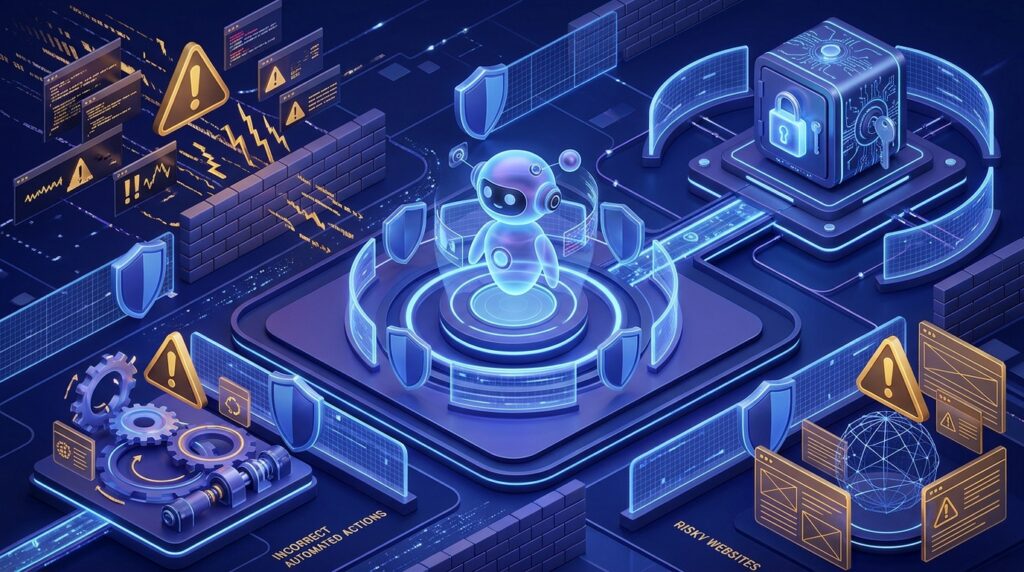
Although 1Password for Agents aims to reduce the exposure of passwords, it cannot eliminate every risk associated with autonomous AI systems.
First, an agent may still make a poor decision after successfully signing in. It could misunderstand a request, change an account setting incorrectly or submit information that the user did not intend to share. Protecting the password does not guarantee that the agent’s actions will be correct.
Second, the destination website remains important. Once a credential is submitted to a site, the website and its scripts operate within their own security environment. A password manager can control how credentials are delivered, but it cannot guarantee that every destination service is trustworthy or free from vulnerabilities.
Third, users still need to evaluate the access requests they approve. If an agent requests a legitimate credential for an inappropriate task, the approval mechanism can only help if the user recognises the problem and declines the request.
Businesses must also consider the security of the devices, browser extensions and AI integrations involved. A compromised device or an unsafe third-party integration can introduce risks that a password manager alone cannot resolve.
Finally, the permissions available after sign-in may be broader than the immediate task requires. If an AI assistant logs in to an account with extensive privileges, the potential impact of an error may remain significant even when the password was never exposed to the model.
For these reasons, 1Password for Agents should be viewed as a way to strengthen credential handling rather than a complete solution for AI security. Effective protection still depends on appropriate permissions, trusted integrations, monitoring and human judgement.
A Step Toward More Secure AI Automation

The arrival of 1Password for Agents reflects a broader shift in how digital security must adapt as AI assistants become more capable. As agents move from generating recommendations to performing real actions, the systems around them need to control not only what they can do but also how they obtain access to the accounts and services they use.
Traditional password management was designed primarily around people signing in to websites themselves. AI agents introduce a different challenge: software may need to authenticate repeatedly while remaining unable to inspect or retain the underlying credentials.
Separating these functions could make delegated digital work more practical. Users may be able to ask AI assistants to complete routine tasks without handing over reusable passwords or exposing every account stored in a vault.
However, trust will depend on more than the convenience of automated logins. Users need to know which integrations they have enabled, what information an agent can access and what happens when something goes wrong. Clear permission controls and reliable security boundaries will remain important as the technology develops.
For businesses, the same principle applies at a larger scale. AI agents should be treated as systems that require carefully managed access, not as ordinary applications that can be given unrestricted credentials. Organisations that combine controlled authentication with monitoring and least-privilege permissions will be better positioned to adopt automation responsibly.
1Password for Agents offers one approach to this challenge by allowing AI assistants to use approved credentials without directly seeing the passwords. Its broader significance lies in the security principle behind the feature: an AI agent may need permission to perform an action, but it does not necessarily need to know the secret that grants access.
As AI agents become more integrated into everyday software, that separation could become an increasingly important part of protecting personal and business accounts.
Learn more: 1Password’s official announcement about AI agent access
More AI coverage: explore Progressive Robot's AI Models, Tools & Releases hub — hands-on reviews, setup guides and benchmarks in one place.










