

Autonomous ERP represents the next stage of enterprise resource planning: a business system that does more than record transactions, enforce workflows, and produce reports. It can understand operational context, detect exceptions, recommend decisions, and allow governed AI agents to complete bounded work across finance, procurement, supply chain, projects, and administration.
Microsoft is increasingly describing Dynamics 365 as an agentic business platform. Dynamics 365 connects ERP and CRM applications with Microsoft 365, Azure, Power Platform, Copilot, and prebuilt or custom agents. Microsoft’s current ERP positioning includes Copilot-generated insights and agents designed to support account reconciliation, supplier communication, time and expense review, procurement, payables, and other operational processes. Availability and release status vary by application, geography, licensing, and whether a capability is generally available or still in preview. ters because traditional ERP often leaves people carrying the operational burden between system steps. Employees export data, check exceptions, chase suppliers, reconcile records, prepare approvals, and explain variances manually. Autonomous ERP aims to reduce that coordination load while preserving the controls required for financial accuracy, compliance, data security, and accountability.
The term does not mean that an ERP system should run a company without people. A credible Autonomous ERP design gives AI limited authority, uses existing business logic, respects permissions, records what happened, and sends material or uncertain decisions to a human owner. The objective is controlled autonomy, not unsupervised automation.
This guide explains how Microsoft Dynamics 365 and Copilot can support that operating model, where the highest-value use cases sit, what architecture is required, which risks must be controlled, and how businesses can move from conventional ERP to an agent-enabled future safely.
What Autonomous ERP Actually Means
Autonomous ERP is an enterprise resource planning environment in which Copilot experiences and AI agents can observe business events, reason within approved context, and perform selected actions through governed workflows.
A conventional ERP waits for a person to open a screen, review a queue, run a report, or initiate a process. An intelligent ERP may predict demand or highlight an overdue balance. Autonomous ERP goes a step further by allowing an agent to monitor the process continuously, collect the relevant context, prepare or execute an allowed action, and escalate when human judgement is required.
Copilot Assists the User
Microsoft Copilot generally works alongside an employee. It can summarise records, answer questions, explain changes, draft content, find information, or help a user navigate a process. In Dynamics 365 Sales, for example, Microsoft documents Copilot experiences that summarise opportunities, surface recent changes, prepare users for meetings, and answer natural-language questions about records. utonomous ERP** model, Copilot reduces the time required to understand the situation. The user remains responsible for deciding what to do unless the workflow delegates a specific action to an agent.
Agents Perform Bounded Work
An agent can operate continuously or react to an event. It may monitor a mailbox for invoices, examine transactions for reconciliation, review time entries against policy, contact suppliers about delivery dates, or prepare a procurement action.
Microsoft’s Business Central Payables Agent, for example, monitors mailboxes for vendor invoices, analyses invoice content, and creates draft records for review. Microsoft describes the desired outcome as requiring few or no corrections before the drafts proceed toward approval and posting. ctical example of Autonomous ERP: the agent completes repetitive preparation, but the organisation retains supervision and approval around financial posting.
Business Logic Remains Authoritative
The AI layer should not replace ERP validation, posting rules, segregation of duties, approval limits, inventory logic, tax configuration, or accounting controls. These remain deterministic system responsibilities.
In a safe Autonomous ERP architecture, generative AI interprets context and proposes or orchestrates work, while Dynamics 365 business logic validates whether the action is permitted and complete.
How Autonomous ERP Changes Business Operations
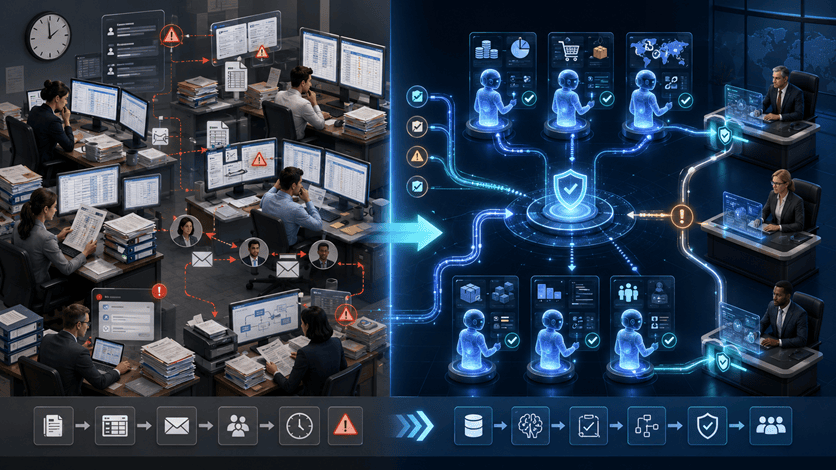
Work Moves From Queues to Exceptions
Traditional ERP work is organised around screens, inboxes, reports, and queues. Employees repeatedly inspect records to discover what needs attention.
With Autonomous ERP, agents can watch for events such as unmatched transactions, overdue confirmations, policy violations, late orders, invoice discrepancies, or unexpected cost movements. Employees can begin with prioritised exceptions instead of searching for them manually.
This changes productivity in a deeper way than simply generating text. The business reduces the delay between an operational issue appearing and the right person receiving a usable action or recommendation.
Processes Continue Between Human Touchpoints
Many ERP processes slow down during the handoff between teams. Procurement waits for supplier confirmation. Finance waits for supporting documentation. Project managers wait for timesheets. Operations waits for approval.
Autonomous ERP can keep the process moving between those touchpoints. An agent can request missing information, prepare a draft, validate a policy, or assemble the evidence needed for approval. The human becomes the control point for judgement rather than the transport mechanism for information.
Operational Context Becomes Easier to Understand
ERP data is often technically complete but difficult to interpret quickly. A manager may need to inspect several records, reports, emails, and spreadsheets before understanding why a result changed.
Copilot can bring those signals together and explain them in natural language. Microsoft’s 2026 release plans continue to expand AI experiences across Finance, Supply Chain Management, Project Operations, Human Resources, Commerce, Business Central, and cross-application finance and operations capabilities. f Autonomous ERP is not only faster reporting. It is faster movement from an exception to a grounded operational response.
Traditional ERP vs Intelligent ERP vs Autonomous ERP
| Capability | Traditional ERP | Intelligent ERP | Autonomous ERP |
|---|---|---|---|
| Primary role | Record and control transactions | Predict, recommend, and assist | Observe, reason, act, and escalate |
| User interaction | Menus, forms, reports, and queues | Dashboards, predictions, and Copilot | Copilot plus event-driven AI agents |
| Process trigger | Human initiates most work | Human initiates with AI assistance | Events or schedules can initiate agent work |
| Exception handling | Employees search and investigate | AI prioritises or explains exceptions | Agents prepare or resolve bounded exceptions |
| Decision authority | Human | Human with recommendations | Delegated by risk and approval level |
| Business controls | ERP rules and workflow | ERP rules plus model governance | ERP rules, agent policies, identity, audit, and human gates |
| Best outcome | Standardised operations | Better decisions | Faster controlled execution |
The progression is important. Businesses should not pursue Autonomous ERP until standard processes, data, roles, and controls are sufficiently mature. Autonomy magnifies the operating model already present in the system.
The Microsoft Dynamics 365 and Copilot Foundation
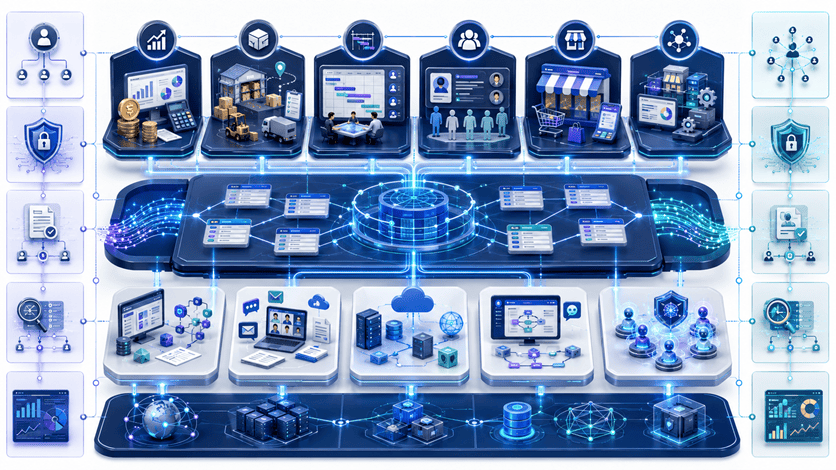
Dynamics 365 Connects Core Operations
Microsoft Dynamics 365 includes applications for finance, supply chain, project operations, commerce, human resources, sales, service, and small or medium-sized business management through Business Central. Microsoft describes the suite as AI-powered business applications that connect with Microsoft 365, Azure, and Power Platform. ous ERP**, this connected foundation matters because an agent needs more than isolated data. It needs the relevant transaction, process state, user permissions, business rule, and downstream action.
Copilot Provides In-Flow Assistance
Copilot experiences appear inside Dynamics 365 applications and Microsoft 365 work surfaces. They help users investigate records, summarise situations, draft content, and find relevant information.
This makes Autonomous ERP easier to adopt because employees do not need to work entirely through a separate AI interface. Assistance can appear in the operational context where the decision is already being made.
Copilot Studio Extends the Agent Layer
Microsoft Copilot Studio allows organisations to build and govern custom agents that use approved knowledge, tools, triggers, and actions. Microsoft also provides prebuilt agents for selected Dynamics 365 processes.
The Dynamics 365 ERP Model Context Protocol server, introduced for finance and operations apps, provides a framework through which agents can access ERP data operations and business logic. Microsoft states that developers can build agents that work with data and perform functions available through the application interface, subject to configuration and access. ty can accelerate Autonomous ERP, but it also increases the importance of least privilege. An agent should receive only the tools, entities, actions, and environments required for its defined purpose.
Power Platform Orchestrates Workflows
Power Automate, Dataverse, Power Apps, process mining, and Power Platform governance can connect ERP actions to wider business workflows. The 2026 release wave includes continued investment in AI agent authoring, self-healing desktop automation, process mining, and governance reporting. obot’s comparison of Power Automate and Zapier explains why Power Automate is often the stronger fit when workflows depend on Microsoft 365, Dynamics 365, Dataverse, identity, and enterprise governance.
High-Value Autonomous ERP Use Cases
Finance: Reconciliation and Close
Account reconciliation is well suited to agent assistance because teams repeatedly compare transactions, identify matches, investigate differences, and document exceptions.
Microsoft’s ERP positioning includes an Account Reconciliation Agent intended to match and clear transactions between ledgers, while release-plan materials describe continued enhancements to account reconciliation automation. ed Autonomous ERP workflow, the agent can propose matches, clear permitted low-risk items, and escalate uncertain or material differences. Finance retains control over thresholds, posting rules, evidence, and final close accountability.
Finance: Payables Processing
Vendor invoice processing combines document intake, data extraction, purchase-order matching, coding, exception handling, approval, and posting.
The Business Central Payables Agent demonstrates how Autonomous ERP can monitor an invoice mailbox, interpret documents, and prepare draft invoices for supervisor review. The safest design keeps posting and payment authority inside established approval and segregation-of-duties controls. perations: Time and Expense Review
Time and expense processes create large volumes of repetitive checking. Entries must comply with policy, contain the correct project and category, and include required evidence.
Microsoft describes the Time and Expense Agent as using Copilot Studio to conduct an initial review of time, expense, and material entries against uploaded policies. Records that meet the criteria can be marked ready for approval. The related Approvals Agent is described as production-ready preview, so businesses should verify current availability before planning deployment. ong Autonomous ERP pattern because the agent performs policy preparation without removing the accountable approver.
Procurement: Supplier Communication
Procurement teams spend significant time confirming delivery dates, requesting updates, recording responses, and escalating supply risk.
Microsoft’s ERP materials describe Supplier Communications and Procurement Agent capabilities that can manage supplier engagement, help confirm delivery, and address risks proactively. Microsoft’s June 2026 source-to-pay guidance positions agents, Finance Agent, Business Performance Analytics, Copilot Studio, and Dynamics 365 as components of a more adaptive procurement model. us ERP** implementation should define which suppliers, purchase orders, message templates, languages, changes, and commitments the agent can handle without additional approval.
Supply Chain: Planning and Exception Response
Supply chains generate continuous changes in demand, supply, inventory, transport, production, and supplier performance. Teams often react after a shortage or delay becomes visible in a report.
Dynamics 365 Supply Chain Management is positioned around AI agents and Copilot from demand through delivery. Microsoft’s 2026 release plan includes improvements in planning, supplier engagement, warehousing, inventory rebalancing, and AI-driven operational experiences. nomous ERP**, an agent might identify a likely shortage, gather alternative supply options, estimate financial and service impact, and prepare a recommended response. Material commitments should remain subject to procurement and financial authority.
Business Central: AI for Growing Businesses
Dynamics 365 Business Central brings finance, sales, purchasing, inventory, projects, and operations together for small and medium-sized organisations. Microsoft’s 2026 release plan continues its move toward intelligent ERP through Copilot skills and autonomous agents for sales and purchase scenarios. obot’s Business Central guide explains how the platform helps growing businesses replace fragmented accounting, spreadsheet, inventory, and approval processes with a connected operating model.
For these organisations, Autonomous ERP may begin with invoice capture, bank reconciliation assistance, product information, sales-order preparation, or purchasing support rather than a large enterprise-agent programme.
Where Autonomous ERP Can Fail
Weak Master Data Creates Automated Errors
ERP agents depend on vendor records, item data, customer information, chart-of-account structure, project coding, policies, and organisational hierarchies. If those foundations are incomplete or duplicated, the agent may confidently accelerate the wrong outcome.
An Autonomous ERP programme should therefore include master-data ownership, quality thresholds, duplicate controls, and remediation before broad agent deployment.
Unclear Process Ownership Blocks Escalation
An agent can detect an exception, but someone must own the decision. Many ERP processes cross finance, procurement, operations, legal, and IT boundaries.
If responsibility is unclear, Autonomous ERP creates faster queues rather than faster resolution. Every agent needs a process owner, operational supervisor, technical owner, data owner, and escalation route.
Excessive Permissions Increase the Blast Radius
An ERP agent with broad read and write access can affect sensitive financial and operational records. Convenience should not justify unrestricted privileges.
Permissions for Autonomous ERP should be narrower than those of a senior administrator. Use dedicated identities, allowed environments, limited actions, field restrictions, approval thresholds, and periodic access review.
Preview Features Can Change
Microsoft release plans include features that may change, arrive later than expected, or remain in preview. Microsoft explicitly notes that planned functionality and timelines can change. ould verify the current product documentation, region, licensing, version, and release status before committing a critical Autonomous ERP workflow to a named agent.
Users May Trust Fluent Explanations Too Quickly
Copilot can produce a clear explanation even when the data, interpretation, or assumptions need review. Financial or supply-chain narratives should link back to source records, calculations, dates, and defined metrics.
The objective of Autonomous ERP is not to replace professional judgement with confident language. It is to shorten the path to a well-supported decision.
Governance and Security for Autonomous ERP
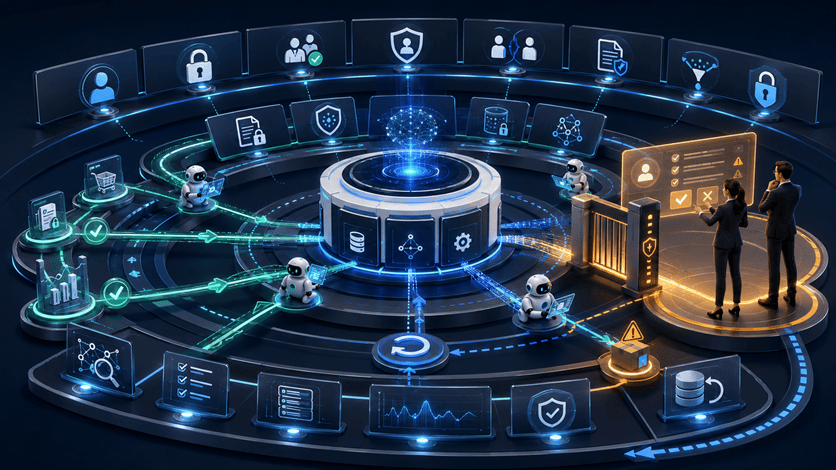
Identity Must Follow the User and the Process
An agent should not become a shortcut around established ERP security. It should use a clearly identified service or user context and operate only within approved roles.
The security model for Autonomous ERP should preserve legal-entity restrictions, row-level access, duty and privilege assignments, approval limits, and segregation of duties.
Data Policies Must Limit Connections and Actions
Copilot Studio supports Power Platform data policies and controls that can restrict knowledge sources, connectors, HTTP requests, tools, channels, triggers, and unauthenticated publishing. Microsoft specifically documents data-policy use cases designed to reduce unintended data loss or exfiltration. s are essential when Autonomous ERP agents connect Dynamics data to email, documents, external services, custom APIs, or event-driven actions.
Sensitive Information Requires Additional Protection
Microsoft Purview can apply data-loss prevention controls to Copilot interactions and can restrict processing or external grounding when prompts contain defined sensitive information. Microsoft also documents Purview capabilities for protecting Copilot Studio agent interactions. us ERP** security design should classify financial, payroll, supplier, customer, employee, tax, and commercial data before enabling broad agent access.
Actions Need Approval by Risk Level
Not every action deserves the same control. Drafting a supplier-status request is different from changing a purchase order. Preparing an invoice is different from releasing payment. Explaining a variance is different from posting an adjustment.
Define autonomy levels for Autonomous ERP according to financial value, reversibility, compliance impact, customer impact, data sensitivity, and model confidence.
Every Agent Needs an Audit Trail
The organisation should be able to determine which agent ran, what triggered it, which data it accessed, what reasoning or rules were applied, which tool was called, what changed, and who approved the result.
Without that evidence, Autonomous ERP cannot support reliable incident investigation, compliance review, financial assurance, or continuous improvement.
Recommended Levels of ERP Autonomy
| Level | Agent behaviour | Example | Required oversight |
| Level 0: Inform | Summarises or explains | Explain a budget variance | User validates source evidence |
| Level 1: Recommend | Proposes an action | Recommend a supplier follow-up | User accepts or rejects |
| Level 2: Prepare | Creates a draft | Prepare an invoice or journal | Named approver reviews |
| Level 3: Execute bounded work | Performs approved low-risk action | Clear a low-value exact match | Thresholds, logging, sampling, rollback |
| Level 4: Orchestrate | Coordinates several approved steps | Resolve a routine procurement exception | Process-owner monitoring and exception gates |
| Level 5: High autonomy | Acts broadly with limited review | Rarely appropriate for core ERP controls | Executive, legal, audit, and risk approval |
Most organisations should build Autonomous ERP around Levels 1 through 3. Higher autonomy should be exceptional and supported by strong evidence, control maturity, and reversible actions.
How to Implement Autonomous ERP Safely
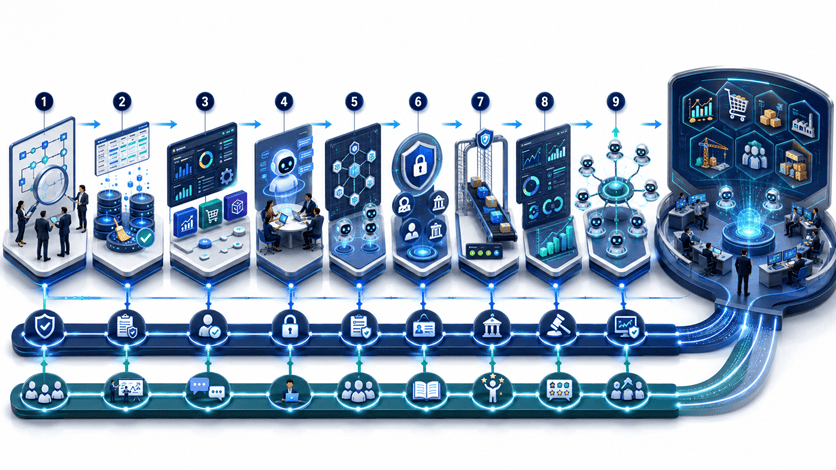
Phase 1: Define the Business Outcome
Begin with a measurable operating problem rather than a general desire to use AI. A strong candidate might reduce reconciliation effort, shorten supplier-confirmation cycles, improve invoice processing time, or lower the number of late project approvals.
The first Autonomous ERP use case should be repetitive, evidence-rich, measurable, and reversible. It should have a clear process owner and a manageable failure impact.
Phase 2: Assess ERP and AI Readiness
Review current Dynamics 365 version, business processes, master data, customisations, integrations, security roles, controls, reporting, support model, and release-management capability.
Progressive Robot’s AI readiness assessment provides a practical framework for evaluating the use case, data, workflow ownership, governance, security, skills, and cost before implementation.
An Autonomous ERP project should be delayed or redesigned when the underlying process is undocumented, highly unstable, or dependent on poor-quality data.
Phase 3: Simplify and Standardise the Process
Do not automate unnecessary complexity. Remove redundant approvals, duplicate data entry, inconsistent local rules, and exceptions that no longer serve a business purpose.
Progressive Robot’s guide to the ERP consultant role explains why process discovery, fit-gap analysis, solution design, data migration, testing, and adoption remain central to ERP success.
The best Autonomous ERP agent operates on a process that the business already understands and can explain.
Phase 4: Establish Data and Control Readiness
Identify the authoritative data sources, required fields, data owners, retention rules, sensitive information, access roles, approval limits, and evidence requirements.
Create measurable readiness gates. For example, supplier master completeness, invoice-match accuracy, policy-document quality, or reconciliation exception rates should meet agreed thresholds before autonomy increases.
Phase 5: Pilot Copilot Before Autonomous Action
Begin by using Copilot to summarise, explain, find information, or generate drafts. This reveals whether users trust the context, whether permissions behave correctly, and whether business terminology is understood.
A Copilot-first pilot gives the organisation evidence before introducing Autonomous ERP actions. It also helps users learn how to challenge and verify AI-assisted outputs.
Phase 6: Introduce One Bounded Agent
Choose a single agent with a narrow purpose. Define its trigger, permitted data, allowed tools, maximum authority, success criteria, refusal conditions, escalation route, logging, and rollback.
A supplier-confirmation agent might be limited to approved suppliers, existing purchase orders, specific message templates, and status updates that do not change commercial terms.
This is safer than launching an Autonomous ERP programme with several interacting agents before the organisation understands agent behaviour in production.
Phase 7: Evaluate With Real Cases
Test normal cases, missing information, contradictory records, policy exceptions, duplicate transactions, restricted data, unusual values, prompt injection, unavailable services, and human overrides.
Evaluation should measure task accuracy, false actions, missed exceptions, approval corrections, processing time, user trust, security violations, and business outcome.
Phase 8: Deploy With Human Gates
Run the agent in observation mode first, then recommendation mode, then draft mode, and only later allow bounded execution.
This staged approach lets the business compare agent decisions with human decisions. Autonomous ERP should earn authority through evidence rather than receive broad access because a demonstration looked impressive.
Phase 9: Monitor and Improve
Track performance, exceptions, overrides, error categories, access denials, response times, operational savings, and downstream incidents.
Review the agent whenever a process, policy, Dynamics release, model, connector, data source, or organisational structure changes.
Measuring Autonomous ERP Value
| Measure | What it shows |
| Process cycle time | Whether the workflow moves faster |
| Manual touches per transaction | Whether repetitive handling is reduced |
| Exception resolution time | Whether issues reach the right owner sooner |
| First-pass accuracy | Whether agents prepare usable work |
| Human correction rate | Where context or rules remain weak |
| Control breach rate | Whether autonomy stays within policy |
| Cost per transaction | Whether automation creates economic value |
| Working-capital impact | Whether finance and supply-chain outcomes improve |
| User adoption | Whether teams trust and use the capability |
| Audit completeness | Whether actions remain explainable and reviewable |
The business case for Autonomous ERP should combine labour efficiency with operational outcomes. Faster invoice preparation matters, but improved payment control, fewer duplicate payments, stronger supplier performance, and a shorter financial close may matter more.
Frequently Asked Questions
What Is Autonomous ERP?
Autonomous ERP is an enterprise resource planning model in which Copilot experiences and governed AI agents can monitor events, interpret context, prepare work, execute limited actions, and escalate exceptions through approved business processes.
It does not mean removing people from financial or operational accountability. It means delegating defined work to software while preserving ERP controls, permissions, approvals, and auditability.
Is Microsoft Dynamics 365 an Autonomous ERP Platform?
Microsoft positions Dynamics 365 as an agentic CRM and ERP platform with Copilot experiences, prebuilt agents, custom-agent development through Copilot Studio, and integration with Microsoft 365, Azure, Dataverse, and Power Platform. level of autonomy depends on the Dynamics application, available agent, release status, configuration, data, security, and business governance.
What Is the Difference Between Copilot and an Autonomous Agent?
Copilot primarily assists a person by answering, summarising, drafting, or recommending within the flow of work. An autonomous agent can run when triggered by an event or schedule and perform approved steps without waiting for a new prompt at every stage.
An Autonomous ERP design commonly uses both: Copilot for interactive work and agents for continuous bounded processes.
Which ERP Processes Should Be Automated First?
Good starting points include invoice intake, transaction matching, routine supplier follow-up, time and expense policy checks, variance summaries, and other repetitive processes with clear evidence and approval rules.
Avoid starting with highly subjective, irreversible, or legally sensitive decisions.
Does Autonomous ERP Replace ERP Employees?
It changes work more than it eliminates entire functions. Employees spend less time moving information and more time managing exceptions, improving controls, negotiating, planning, and making decisions.
Roles will still change. Businesses should plan training, accountability, and adoption as part of the implementation rather than treating the project as a software installation only.
Can Agents Post Financial Transactions Automatically?
Technically, an appropriately authorised agent may be able to perform ERP actions. Whether it should do so depends on risk, materiality, segregation of duties, reversibility, audit requirements, and evidence from testing.
Most Autonomous ERP programmes should begin with recommendations and drafts before permitting low-risk bounded execution.
How Does Microsoft Secure Copilot and ERP Agents?
Microsoft provides controls through Dynamics 365 roles, Microsoft Entra identity, Power Platform environments and data policies, Copilot Studio governance, Microsoft Purview, logging, and administrative controls. The organisation remains responsible for configuring those controls according to its data, risk, and compliance requirements. Does an Autonomous ERP Programme Take?
A narrow Copilot or agent pilot can move much faster than a full ERP transformation. The wider programme depends on process maturity, data quality, Dynamics configuration, integrations, security, testing, user adoption, and the number of business areas involved.
A phased approach is safer than trying to make the entire ERP autonomous at once.
Conclusion
Autonomous ERP changes enterprise resource planning from a system that waits for users into a governed operational platform that can assist, monitor, prepare, execute, and escalate work.
Microsoft Dynamics 365 provides the connected finance, supply-chain, project, commerce, HR, and business-management foundation. Copilot helps people understand and complete work in context. Prebuilt and custom agents can carry selected processes forward between human decisions. Power Platform, Copilot Studio, Microsoft Entra, and Microsoft Purview provide important integration and governance capabilities.
The future is not an ERP system making every decision alone. The practical future is Autonomous ERP with clearly defined authority: routine work moves automatically, exceptions surface earlier, material actions receive human judgement, and every step remains controlled and auditable.
Businesses should begin with one measurable workflow, strengthen the underlying data and process, pilot Copilot assistance, introduce one bounded agent, and expand autonomy only when evidence supports it.
Progressive Robot helps organisations assess ERP readiness, redesign business processes, implement automation, and build governed AI agents around Microsoft and enterprise platforms. Explore Business Automation, review the AI Readiness Assessment, or contact Progressive Robot to discuss an ERP and Copilot roadmap.










