
A Personal Finance App helps users manage money, track expenses, and plan budgets digitally. These apps replace traditional spreadsheets and paper records. They offer real-time insights into financial health.
Additionally, a Personal Finance App can connect to bank accounts automatically. Users see all transactions in one place without manual entry. Many apps also provide investment tracking and bill reminders.
Moreover, modern Personal Finance Apps use AI for smart recommendations. They analyse spending patterns to suggest better money habits. This makes financial management effortless and proactive.
The demand for Personal Finance Apps is growing rapidly. By 2030, the market will reach $1.61 billion. Now is the perfect time to build one.
Why Build a Personal Finance App?

Financial management is shifting to mobile-first solutions. People want convenience and instant access to their money data. A Personal Finance App meets this demand effectively.
Furthermore, these apps help users save more and spend wisely. Features like budget tracking and goal setting improve financial discipline. This creates loyal, long-term users.
Another advantage is revenue potential. Premium features, subscriptions, and partnerships generate steady income. Apps like Mint and YNAB prove this model works.
Banks and fintech startups benefit equally. A well-designed Personal Finance App enhances customer engagement. It also reduces reliance on physical branches.
Key Features of a Personal Finance App
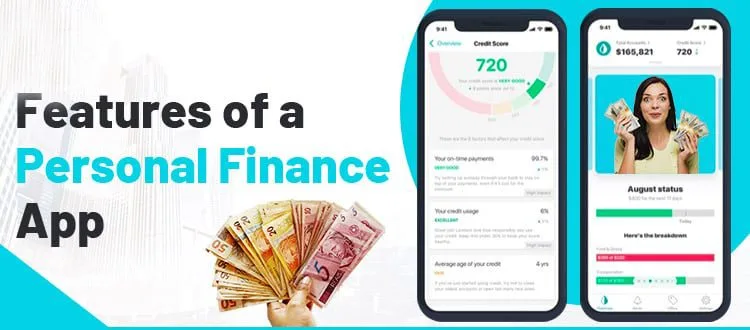
User Registration & Secure Login
Allow sign-up via email, phone, or social media. Add biometric authentication for extra security.
Bank Account Integration
Connect to banks via APIs like Plaid. Automatic transaction syncing saves users time.
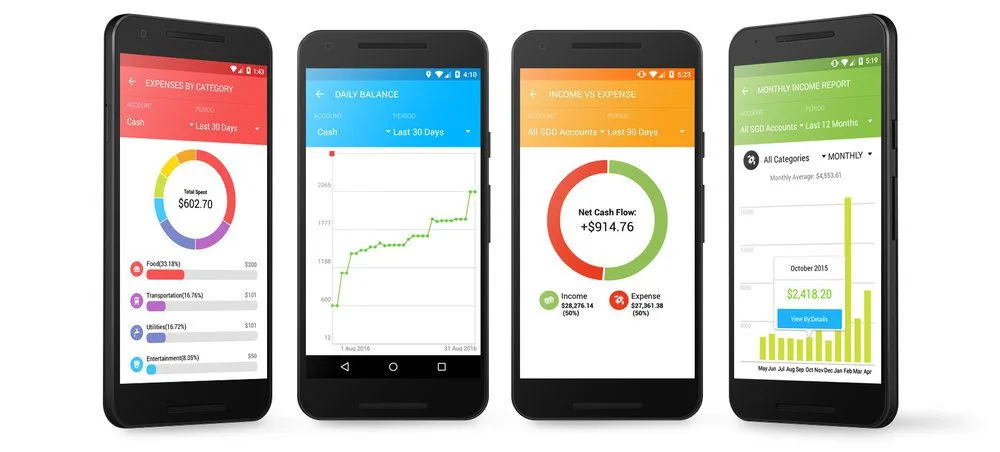
Expense Tracking & Categorisation
Users should tag purchases (food, bills, entertainment). Visual charts make spending clear.
Budget Planning Tools
Set monthly limits for categories. Send alerts when users near their budget caps.
Bill Payment Reminders
Notify users before due dates. Late fees hurt credit scores—prevent them.
Investment Tracking
Sync with brokerage accounts. Show portfolio growth and dividend earnings.
AI-Powered Insights
Analyse spending to suggest savings. For example: “Spent 30% more on dining this month.”
Multi-Device Sync
Data should update across phones, tablets, and web apps instantly.
Types of Personal Finance Apps
Budgeting Apps
Apps like Mint focus on expense tracking. They categorise spending and suggest budgets.
Investment Apps
Platforms like Personal Capital track stocks and retirement funds. They offer portfolio advice.
Debt Management Apps
Tools like YNAB help users pay off loans faster. They optimise repayment strategies.
Expense Splitting Apps
Splitwise simplifies shared costs for roommates or groups. It tracks who owes what.
Tax Preparation Apps
TurboTax and others import financial data to streamline tax filing.
Steps to Build a Personal Finance App

Define Your Target Audience
Identify user needs—students, freelancers, or families? Research their pain points.
Analyse Competitors
Study top apps like Mint and PocketGuard. Note missing features you can improve.
Choose Core Features
Start with budgeting and bank sync. Add investments or taxes later.
Prioritise Security
Use encryption, two-factor auth, and regular audits. Financial data must be protected.
Select Tech Stack
Frontend: React Native or Flutter.
Backend: Node.js or Python.
Database: PostgreSQL or Firebase.
Design UI/UX
Keep interfaces clean and intuitive. Dark modes and minimalism work well.
Develop & Test
Build an MVP first. Test rigorously for bugs and security flaws.
Launch & Market
Release on app stores. Use social media and finance blogs for promotion.
Tech Stack for Personal Finance Apps
Frontend Development
Cross-Platform: Flutter or React Native (single codebase for iOS/Android).
Native: Swift (iOS) or Kotlin (Android) for better performance.
Backend Development
Node.js: Handles real-time data well.
Python (Django): Secure and scalable for financial apps.
Database Solutions
PostgreSQL: Relational DB for structured financial data.
MongoDB: NoSQL for flexible schema needs.
APIs & Integrations
Plaid: Connects to 15,000+ banks.
Stripe: Processes in-app payments.
Twilio: Sends SMS alerts.
Cost to Build a Personal Finance App
A basic Personal Finance App costs 25,000–50,000. Advanced apps with AI and investments run 75,000–150,000.
Factors affecting cost:
Features: Budget tracking is cheaper than stock analysis.
Platforms: iOS + Android doubles development.
Team Location: US (100/hour)vs.EasternEurope(40/hour).
Challenges in Development
Data Security
Financial apps are hacker targets. Solution: Use bank-grade encryption (AES-256).
Bank API Reliability
Some banks limit third-party access. Solution: Partner with Plaid or Yodlee.
User Retention
Many abandon budgeting apps. Solution: Gamify savings with rewards.
Regulatory Compliance
Follow GDPR (EU) and CCPA (California). Store data securely.
Why Choose Progressive Robot?
Progressive Robot specializes in secure, user-friendly Personal Finance Apps. Our expertise includes:
Bank-Grade Security: Encryption, 2FA, and compliance checks.
AI Integration: Smart spending insights and alerts.
Cross-Platform Apps: Flutter and React Native for wider reach.
Ongoing Support: Updates, bug fixes, and feature additions.
We’ve helped startups and banks launch successful money apps. Partner with us for a top-tier solution.
Future Trends
AI-Powered Forecasting
Predict cash flow issues before they happen.
Voice-Activated Controls
“Hey app, how much did I spend on coffee this month?”
DeFi Integration
Track crypto wallets alongside traditional accounts.
Carbon Footprint Tracking
Show how spending impacts the environment.
Conclusion
Building a Personal Finance App requires planning, security, and great UX. Start with budgeting basics, then expand with investments or AI.
Partner with Progressive Robot for a secure, scalable solution. Launch your app and help users master their money!
FAQs
How long does it take to build?
3–6 months for an MVP, 9–12 months for advanced features.
What’s the best tech stack?
React Native (frontend), Node.js (backend), PostgreSQL (database).
How do Personal Finance Apps make money?
Freemium models, subscriptions, ads, or affiliate partnerships.
Is Plaid API free?
No—it charges per user. Budget 0.50–1.50 per active monthly user.
Can I build an app without coding?
No-code tools exist but lack customisation. For full control, hire developers.
Start your Personal Finance App project with Progressive Robot today!










