
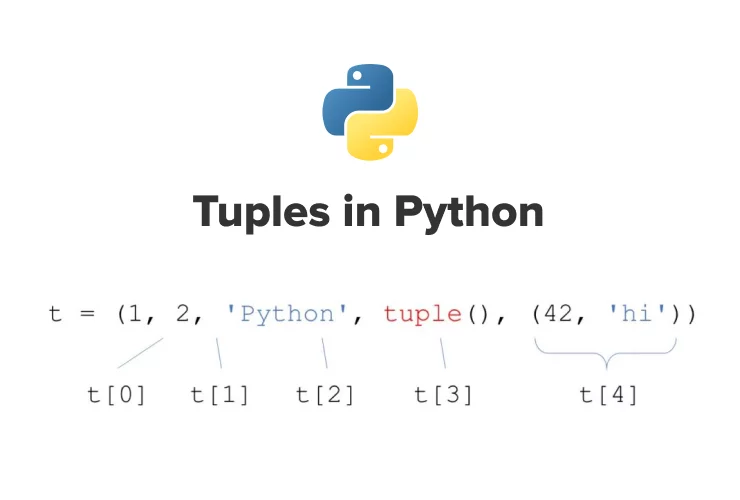
Understanding tuples in Python 3 is one of the most important skills for writing clean, efficient, and safe Python code — tuples are immutable, ordered sequences that let you group related data together without allowing changes after creation, making them perfect for fixed collections, function returns, dictionary keys, coordinates, records, and any data that should never be modified.
In this up-to-date 2025–2026 guide, you’ll master exactly how tuples in Python 3 work: creating tuples, indexing & slicing, concatenation & replication, unpacking, converting to/from lists, using as dictionary keys, common use cases, differences from lists, and best practices. All examples are tested on Python 3.10–3.13.
Key Takeaways – Tuples in Python 3
- Tuples in Python 3 are immutable, ordered sequences defined with parentheses () (or without for simple cases).
- Use tuples when data should never change (coordinates, function returns, dictionary keys, records).
- Index & slice tuples exactly like lists: positive/negative indices, [start:end:step], reverse with [::-1].
- Concatenate with +, replicate with *, unpack with a, b = tuple.
- Convert to list with list(tuple) (to modify), back to tuple with tuple(list).
- Tuples are faster and use less memory than lists — important for large datasets or performance.
- Tuples can be used as dictionary keys (because immutable) — lists cannot.
- Single-item tuples require trailing comma: (value,) — without comma it’s just parentheses.
Prerequisites
- Python 3.8+ installed
- Basic Python knowledge (strings, lists, indexing)
- Interactive shell (python3) or script file
1. Creating Tuples in Python 3
					# Most common way
coral = ('blue coral', 'staghorn coral', 'pillar coral', 'elkhorn coral')
print(coral)
# ('blue coral', 'staghorn coral', 'pillar coral', 'elkhorn coral')

# Without parentheses (tuple packing)
point = 10.5, 20.8
print(point)  # (10.5, 20.8)

# Single item tuple (trailing comma required)
single = ('hello',)
print(type(single))  # <class 'tuple'>

# Empty tuple
empty = ()
print(empty)  # ()
2. Indexing & Slicing Tuples in Python 3
Exactly like lists — zero-based positive & negative indexing:
					print(coral[0])     # blue coral
print(coral[-1])    # elkhorn coral
print(coral[1:3])   # ('staghorn coral', 'pillar coral')
print(coral[::-1])  # reverse order
IndexError if out of range:
# coral[10] → IndexError: tuple index out of range
3. Concatenating & Replicating Tuples
					kelp = ('wakame', 'alaria', 'deep-sea tangle')

# Concatenate
combined = coral + kelp
print(combined)

# Replicate
print(coral * 2)        # duplicate tuple

# Compound assignment
coral += ('yeti crab',)
print(coral)
4. Tuple Unpacking – Very Powerful Feature
Assign multiple variables at once:
					# Unpack tuple
latitude, longitude = 40.7128, -74.0060
print(latitude, longitude)  # 40.7128 -74.0060

# Unpack with *
head, *middle, tail = (1, 2, 3, 4, 5)
print(head)     # 1
print(middle)   # [2, 3, 4]
print(tail)     # 5
Very common for returning multiple values from functions:
					def get_user():
    return "James", 30, "London"

name, age, city = get_user()
print(f"{name} is {age} from {city}")
5. Converting Between Tuples and Lists
					# Tuple → List (to modify)
my_tuple = (1, 2, 3)
my_list = list(my_tuple)
my_list[0] = 99
print(my_list)      # [99, 2, 3]

# List → Tuple (immutable again)
back_to_tuple = tuple(my_list)
print(back_to_tuple)  # (99, 2, 3)
6. Using Tuples as Dictionary Keys (Because Immutable)
					locations = {
    (40.7128, -74.0060): "New York",
    (24.8607, 67.0011): "Karachi"
}

print(locations[(24.8607, 67.0011)])  # Karachi
Lists cannot be dictionary keys (mutable → error).
7. Best Practices & Modern Tips (2025–2026)
- Use tuples for fixed data: coordinates, function returns, constant records.
- Prefer tuples over lists when data shouldn’t change — better memory & performance.
- Always use trailing comma for single-item tuples: (value,)
- Use unpacking everywhere — cleaner than indexing.
- Type hints: point: tuple[float, float] = (10.5, 20.8)
- Return tuples from functions instead of multiple values — more explicit.
How to Use Tuples in Python 3 – FAQ (2025–2026)
- How do I create tuples in Python 3?
Use parentheses: (1, 2, 3) or just commas: 1, 2, 3 — basic tuples in Python 3. - What’s the main difference between tuples and lists in Python 3?
Tuples are immutable (cannot change); lists are mutable. - How do I access items in tuples in Python 3?
Same as lists: my_tuple[0], my_tuple[-1], slicing [1:4]. - Can tuples be used as dictionary keys in Python 3?
Yes — because immutable — lists cannot. - How do I unpack a tuple in Python 3?
a, b = (1, 2) or head, *rest = my_tuple — very powerful.
Summary
You now know exactly how tuples in Python 3 work: creating, indexing & slicing, concatenation & replication, unpacking, converting to/from lists, using as dictionary keys, and modern best practices.
Mastering tuples in Python 3 gives you safer, faster, and more explicit code — use them for anything that should never change after creation.
Recommended Next Tutorials
- Tuples vs Lists vs Sets – When to Use Each
- Python Unpacking & Extended Iterable Unpacking
- Python Named Tuples (collections.namedtuple)
- Build a Coordinate & Record System with Tuples
- Python Data Structures Cheat Sheet










