
Today’s mobile users demand instant access to services. They want quick solutions without downloading full apps. Waiting for installations frustrates many potential customers. This shift in behavior has led to new technologies.
Apple App Clips and Android Instant Apps solve this problem. They let users access app features immediately. No installation creates a frictionless experience. Businesses benefit from higher engagement rates. This article explores how these technologies work for on-demand solutions.
What Are Apple App Clips?
Apple App Clips provide small pieces of app functionality. They work without full installation from the App Store. Users get just the features they need right now. The system keeps file sizes extremely small.
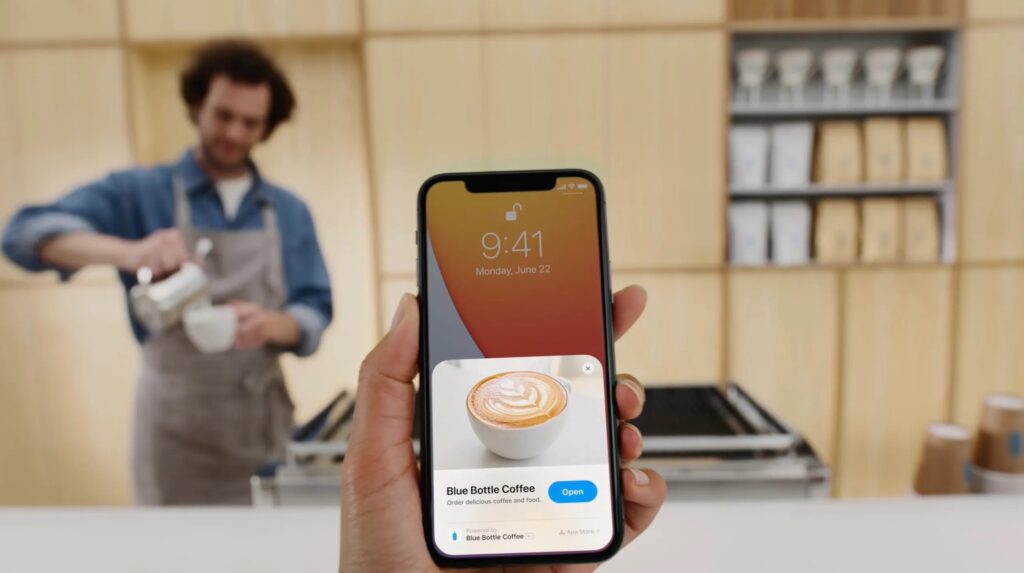
These mini-apps trigger in multiple ways. QR codes and NFC tags work perfectly. Web links can also launch them instantly. The experience feels seamless and native. Users complete tasks in seconds rather than minutes.
Key benefits include instant access and no storage worries. The design focuses on single-purpose interactions. Apple Pay integration makes payments smooth. Users can later install the full app if needed.
What Are Android Instant Apps?

Android Instant Apps offer similar benefits to Apple’s solution. They load specific app modules without installation. Deep links activate them from search or messages. The experience matches regular apps but loads faster.
These instant versions use minimal device resources. They show only relevant screens and options. Privacy controls remain strict like full apps. Users can upgrade anytime with one tap.
The technology helps overcome installation barriers. Shopping and service apps benefit most. Conversion rates improve with instant access. User drop-off during installation disappears completely.
Comparing Both Technologies
Apple App Clips and Android Instant Apps share core goals. Both reduce friction in mobile experiences. Each platform implements the concept differently though.
Apple uses physical triggers like QR codes prominently. Android relies more on digital deep links. Both integrate payment systems natively. User data syncs if they install the full app later.
File size limits differ between the platforms. Apple enforces stricter size constraints. Android allows slightly more flexibility. Both maintain excellent performance standards.
Developing Effective Solutions
Creating great Apple App Clips and Android Instant Apps requires planning. Focus on the most essential features first. Remove everything not needed for the core task.
Design must remain clean and intuitive. Users should complete actions in three steps or less. Keep branding consistent with main apps. Performance optimization is critical.
Backend systems need robust APIs. Real-time data keeps experiences fresh. User sessions should transfer to full apps seamlessly. Testing across devices prevents issues.
Ideal Use Cases
Certain industries benefit most from these technologies. Retail and e-commerce see immediate results. Customers buy faster without app installations.
Food delivery services improve conversion rates. Parking and transit apps work better instantly. Event ticketing becomes nearly frictionless. Service booking flows simplify dramatically.
Even social apps benefit from instant access. Content sharing and viewing happens quicker. The technology suits any on-demand service model well.
Technical Implementation
Building Apple App Clips starts with Xcode. Developers create separate targets for clips. The system shares some code with main apps. Size must stay under 10MB initially.
Android Instant Apps require modular architecture. Features split into independent components. Gradle manages dependencies between modules. Instant experiences can use most Android APIs.
Both platforms need thorough testing. Network conditions affect performance greatly. Developers should simulate slow connections. Various device sizes require interface adjustments.
Real-World Success Stories
Major companies already see results from these technologies. A coffee chain increased mobile orders by 40%. Their App Clip lets customers pay via QR codes instantly.
An airline reduced check-in time by 60%. Passengers scan boarding passes to launch Instant Apps. The solution works even without the main app installed.
E-commerce stores report higher conversion rates. Product links open directly in Instant Apps. Customers complete purchases in fewer steps.
Future Developments
Apple App Clips and Android Instant Apps will keep evolving. Better discovery methods are coming. More trigger types will emerge over time.
Offline functionality is improving gradually. Machine learning will personalize instant experiences. Cross-platform solutions may develop too.
The technology will expand to new industries. Healthcare and education show great potential. Even enterprise tools will adopt instant access.
Common Challenges
Developers face some hurdles with these technologies. Size limitations restrict complex features. Some APIs aren’t available in instant versions.
User education remains important. Many don’t understand instant app concepts yet. Clear prompts help guide first-time users.
Monetization differs from full apps. Subscription flows need special handling. Ads often don’t work in limited contexts.
Best Practices
Focus on single-purpose experiences first. Measure performance metrics carefully. Optimize loading times above all else.
Use platform-specific capabilities fully. Apple’s App Clip codes provide physical triggers. Android’s instant installs work well for web links.
Collect user feedback continuously. Improve flows based on behavior data. Update instant experiences regularly like main apps.
Security Considerations
Privacy matters in instant experiences too. Follow all platform guidelines strictly. Request permissions only when absolutely needed.
Secure all network communications properly. Use the same standards as full apps. Protect user data during transfers to main apps.
Session handling requires special attention. Tokens must transfer securely between contexts. Never store sensitive data in instant versions.
Performance Optimization
Loading speed makes or breaks instant apps. Compress all assets aggressively. Lazy load non-essential resources.
Cache wisely within platform limits. Prefetch data when possible. Monitor real-world performance metrics.
Reduce network calls wherever feasible. Bundle requests intelligently. Handle offline scenarios gracefully.
Marketing Instant Experiences
Promote instant access points clearly. Highlight the no-installation benefit. Use physical signage for QR codes effectively.
Include instant links in all digital marketing. Email campaigns should use them prominently. Social media posts benefit from instant access.
Track which triggers perform best. Optimize placement based on real data. Continuously test new activation methods.
Analytics Implementation
Measuring performance is crucial for Apple App Clips and Android Instant Apps. Track instant experience metrics separately from full app data. Monitor completion rates specifically for these lightweight versions.
Identify exact drop-off points in Apple App Clips and Android Instant Apps flows. Compare user behavior between instant and full app experiences. Notice where interaction patterns differ significantly.
Adapt designs based on Apple App Clips and Android Instant Apps analytics. Connect usage data directly to business outcomes. Demonstrate how instant access boosts conversions clearly.
The analytics strategy should prove the unique value of Apple App Clips and Android Instant Apps. Show stakeholders the concrete benefits these technologies deliver. Use data to justify further investment in instant experiences.
Cost Considerations
Developing Apple App Clips and Android Instant Apps involves unique cost factors. While smaller in scope than full apps, they require specialized development approaches. The reduced feature set offers some budget savings initially.
However, Apple App Clips and Android Instant Apps demand rigorous testing across more scenarios. Developers must verify performance under various trigger conditions. This comprehensive testing can offset some of the initial cost advantages.
Maintaining Apple App Clips and Android Instant Apps represents an ongoing investment. These lightweight versions require regular updates alongside their full app counterparts. Budget should account for continuous optimization of instant experiences.
The ROI of Apple App Clips and Android Instant Apps typically justifies the investment. Higher conversion rates from instant access often cover development costs quickly. Improved user satisfaction delivers long-term loyalty benefits.
Platform Limitations
Developers working with Apple App Clips and Android Instant Apps must navigate specific platform constraints. Both technologies have unique limitations that affect implementation choices. Feature availability differs significantly between these instant solutions.
Apple App Clips face strict size restrictions (10MB initially) that Android Instant Apps don’t share. However, Android Instant Apps have more compatibility challenges across device manufacturers. Some hardware features may work inconsistently on different Android models.
Older OS versions present limitations for both platforms. Apple App Clips require iOS 14 or later, while Android Instant Apps need at least Android 8.0 (Oreo). Teams must carefully determine their minimum OS requirements and implement graceful fallbacks for unsupported devices.
Conclusion

Apple App Clips and Android Instant Apps transform mobile experiences. They remove installation friction completely. Businesses see higher engagement and conversions.
Developing effective solutions requires focus. Performance and simplicity matter most. Continuous improvement ensures long-term success.
Progressive Robot specializes in instant app development. Our team builds high-performing solutions. We help businesses leverage this technology fully.
Contact us today to discuss your project. Let’s create frictionless experiences together.